
Get creative and crafty with Blaisdell Memorial Library’s very own button making machine!
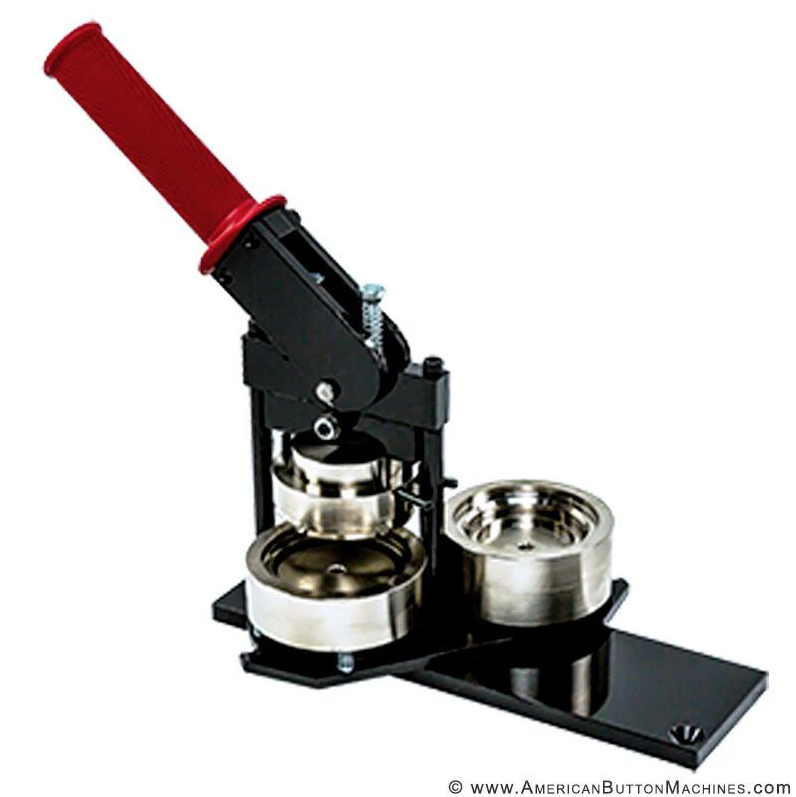
BML’s button maker lets you easily turn your designs and art into 2.25″ pinback buttons, magnets, and keychains. It is available for in-library use for community members and patrons and cannot be borrowed or removed from the library premises.
Those interested in using the button maker may request it at the front desk. A staff member will help you set up the necessary machines and instruct you in their use if needed.
Material Costs
Supplies for the button maker are sold at the front desk for a small fee. Each purchase includes all the materials needed to create one item, except for the image itself. Supply costs are as follows:
| Type of Item | Supply Cost |
|---|---|
| Pinback Button | 25¢ each or 5 for $1.00 |
| Magnet | 50¢ each |
| Keychain | 75¢ each |
Preparing a Button Design
BML has blank templates available to help patrons design and size their buttons. Digital templates are available below as a PNG, PSD, or PUB file, or you may purchase a pre-printed blank template sheet for 15¢ per page. Each template can make six buttons.
Download your Button Design Template Here
Using the Button Templates
Interested in designing your own button using a digital template? Click for full details on sizing and centering your images for the best results.
Each template consists of multiple circles which can be used to align and size your design. Below is an example of how to read the guide circles:
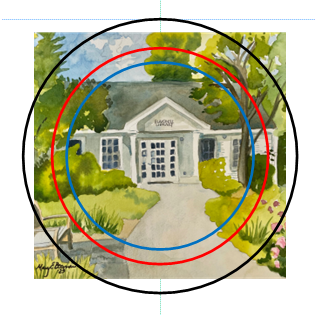
The black guideline is slightly larger than the finished button. The middle guideline in red represents the actual size of the finished button, and the blue circle represents the general size of the focus of the button when finished.
The black circle is an outer margin. Anything in the area between it and the red circle won’t show in the final button, but by extending your design into this space you give yourself some leeway when cutting it out.

The red circle represents the full size of the finished button. Your design should be sized and positioned to fill this area, but as the very edges of the button are curved, images between the red and blue circles may turn out distorted. To prevent any issues, try to keep text and important images within the blue circle.
To the right, you can see how the image above and it’s guidelines translated into a finished button! All guidelines except for the largest was removed before printing.
Pre-printed button template sheets only include the largest outer circle. Please be careful not to fill the entire area of these templates or images may be cut off!
Using the Button Machine
Operating the button maker and circle cutting tool is simple, but can require some force. There is always a small risk of injury if used incorrectly, so we highly recommend all patrons receive an in-person demonstration before using it. Children under the age of 13 should not operate the button maker and should only use the circle cutting tool with adult supervision.
You can learn more about using the button maker from the manufacturer tutorial below, or the demonstration video our staff made for Tiktok!
 Blaisdell Memorial Library